
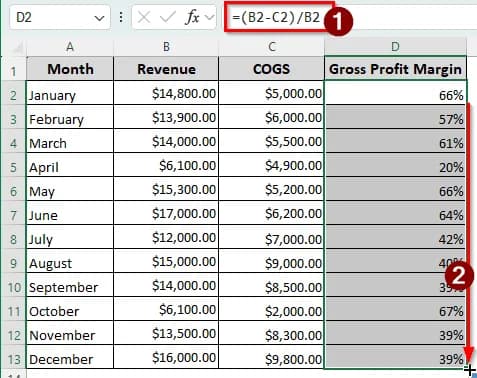
One of the most useful key performance indicators (KPIs) in a business is the gross profit margin. By calculating the gross profit margin, we get the profit margin we are gaining on the cost of goods sold. Analysts can use this data to find trends in sales and direct costs, and help management make informed decisions. Although Excel does not provide a dedicated function to calculate this, the general formula is very simple. In this article, we will learn how to calculate gross profit margin in Excel.
=(B2-C2)/B2
➤ Replace B2 with the revenue/sales revenue, and C2 with the COGS/Direct Expense.
➤ Autofill other cells in the table if you have multiple gross profit margins to calculate.
That formula was very straightforward, but in reality, most companies will do a bit more calculation before going for the margin. In this article, we will learn two methods to calculate the gross profit margin in Excel.
Calculating Gross Profit Margin Using Gross Profit Formula in Excel
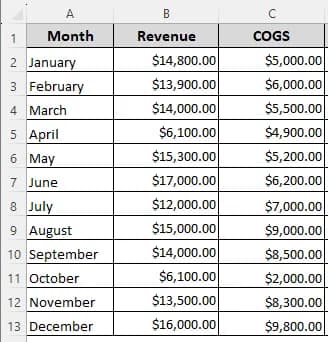
We have information for a year to calculate the gross profit margin of. There are the revenues and COGS values for twelve months. We will use this information to demonstrate the methods in this tutorial.
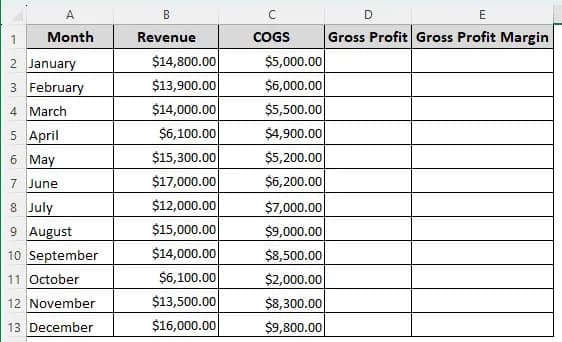
➤ First, create two columns to calculate gross profit and gross profit margin.
➤ Calculate the gross profit using the following formula in D2. Then, use the autofill handle to autofill the table till D13:
=B2-C2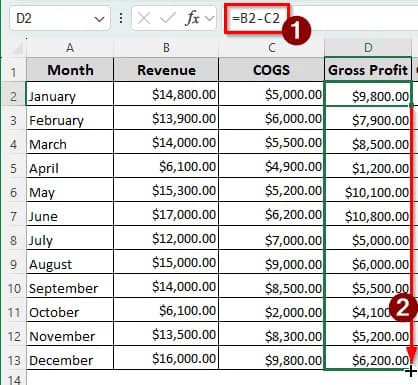
➤ Now, calculate the gross profit margin in the E2 cell using the following formula and autofill:
=D2/B2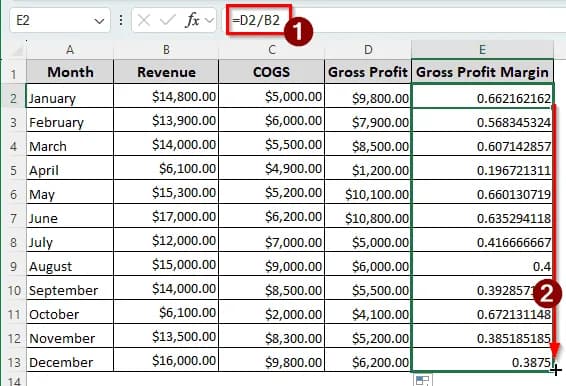
➤ The values are shown in decimals. To make them show up as percentages, select E2:E13 cells, and select the percentage (%) icon from the Number group of the Home tab in the ribbon.
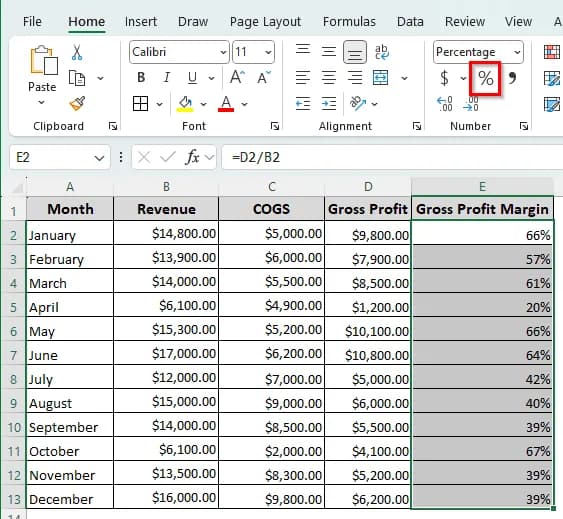
➤ You can also press Ctrl + Shift + % after selecting the cells to change the number format.
Making Use of VBA to Calculate Gross Profit Margin in Excel
We already know that Excel does not provide a dedicated function for calculating gross profit margin. However, using VBA, we can create our own custom function to calculate the gross profit margin. Follow the steps below:
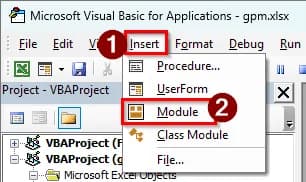
➤ Press Alt + F11 to open the Microsoft Visual Basic for Applications.
➤ Go to Insert > Module to open the code editor window.
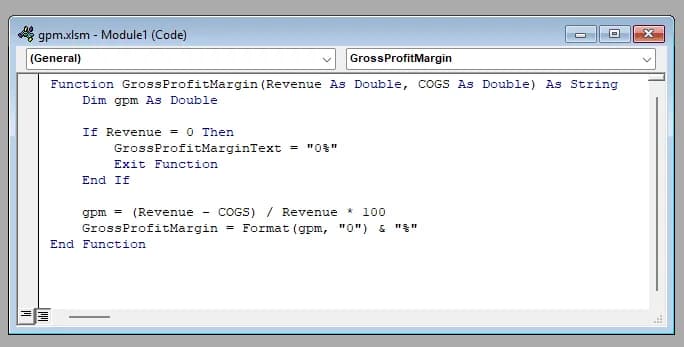
➤ Insert the following code in the code editor:
Function GrossProfitMargin(Revenue As Double, COGS As Double) As String
    Dim gpm As Double
    If Revenue = 0 Then
        GrossProfitMarginText = "0%"
        Exit Function
    End If
    gpm = (Revenue - COGS) / Revenue * 100
    GrossProfitMargin = Format(gpm, "0") & "%"
End Function
➤ Go back to the worksheet, and add a column for the gross profit margin.
➤ Add the following formula and autofill the table:
=GrossProfitMargin(B2,C2)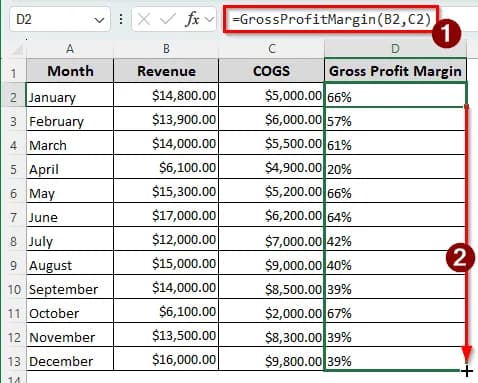
Downloadable Resources
Get our practice workbook or necessary files that we have worked with to prepare this article.
Calculate Gross Profit Margin.xlsx
Frequently Asked Questions
What is a 30% margin on $100?
For the gross profit margin, if you get a 30% margin on $100, it means that in your $100 of revenue, your profit is $30, and the rest goes for direct costs. You earned 30 dollars from the 100-dollar transaction.
Is a 43% gross margin good?
Usually, a business has a lot of expenses other than the COGS. To cover those costs, a gross margin under 50% is not healthy. Therefore, a 43% gross margin is not good. However, if you are operating in a sole proprietorship, 43% can be enough.
What is the difference between a 30% margin and a 30% markup?
Let’s understand this with an example. If you bought a product for $100 and sold it for $130, it is a 30% markup. If you bought a product for $70 and sell it for $100, that is a 30% margin. Margin is calculated on the selling price, and markup is calculated on the cost.
Which one is better, markup or margin?
There is no better or worse option here; it depends on how the company sets its budget. If the company is going for a markup pricing, it will use markup. However, margin is usually used when setting the marketing budget and how much margin they can gain against the budget they set.
How to convert markup to margin?
Here is the Excel formula to convert markup to margin:
=A1/(1+A1)
Here, A1 is the markup percentage. For example, if A1 contains 25%, Excel will return 20%.
Wrapping Up
In this article, we have learned two methods for calculating gross profit margin in Excel. The Excel file with the formula and the VBA code is available to download for free. Comment down on what topic you want the next tutorial to be. Stay tuned for our next article.