After acquiring an expensive fixed asset, businesses calculate depreciation on it to spread the cost over a period of years and prepare to replace it when the asset reaches the end of its useful life. There are several methods for calculating depreciation in Excel. One of the oldest methods of calculating depreciation is the written-down value method. In this article, we will learn how to calculate depreciation using the WDV method of depreciation formula in Excel.
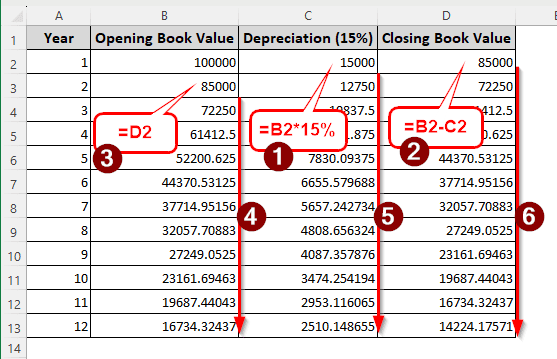
➤ Calculate the depreciation using the following formula:
=B2*15%
➤ Here, B2 is the opening book value, and 15% is the rate of depreciation.
➤ Calculate the closing book value using the formula below:
=B2-C2
➤ Here, C2 is the depreciation amount.
➤ Refer to the closing book value as the next year’s closing book value.
➤ Autofill other cells using the previous formulas.
While it looks like it requires a lot of steps, it is actually really easy to calculate the depreciation using the WDV method. However, to understand the method properly, we suggest that you download the practice Excel file and follow along with the step-by-step guide below.
What is the WDV Method in Finance?
WDV, or the written-down value, is a method of calculating the depreciation of assets. In the written-down value method, we consider the asset value according to the one that was written down in the previous year. The formula for the WDV method is Opening Value of the Present Year/Closing Value of the Previous Year * Depreciation percentage.
In India and neighbouring countries, the WDV method is calculated using a fixed percentage. In the US, however, the WDV method is usually called the Declining Balance method. The salvage value is considered before selecting a percentage, and only then is the depreciation calculated.
Calculating WDV Manually Using a Depreciation Rate
Here, we have the asset price of $10000, and the depreciation percentage is declared to be 15%. We need to calculate the depreciation using the WDV method for 12 years.
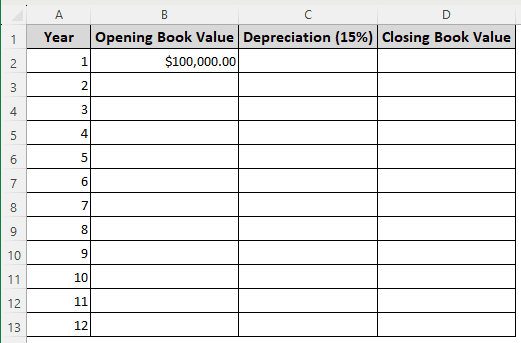
➤ In the C2 cell, write the following formula, and autofill till C13:
=B2*15%
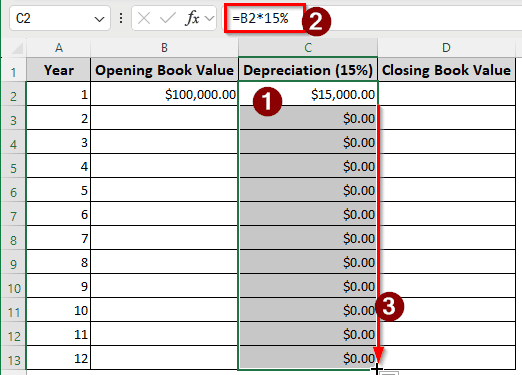
We are multiplying the opening book value by the depreciation rate to calculate the depreciation.
➤ The other rows show $0; this is normal. The values will change as we fill other cells.
➤ In the D2 cell, write the following formula, and autofill:
=B2-C2
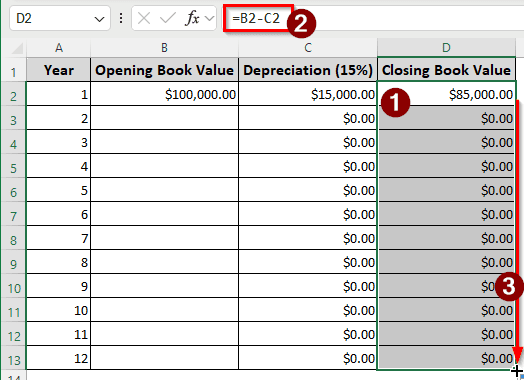
The depreciation is subtracted from the opening book value to calculate the closing book value.
➤ Write the following formula in the B2 cell and autofill the column.
=D2
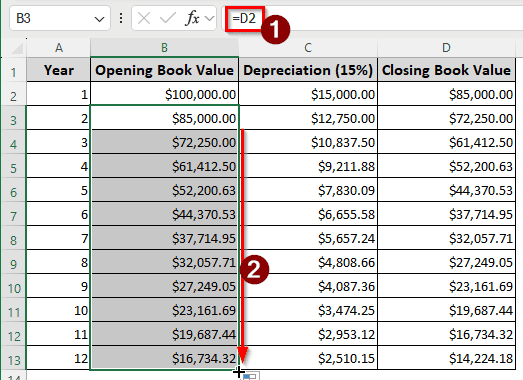
The closing book value of the previous year is the opening book value of the new year.
➤ Now the rest of the cells are filled automatically because of the autofill we did before.
Using the DB Function to Calculate the Depreciation with Salvage Value
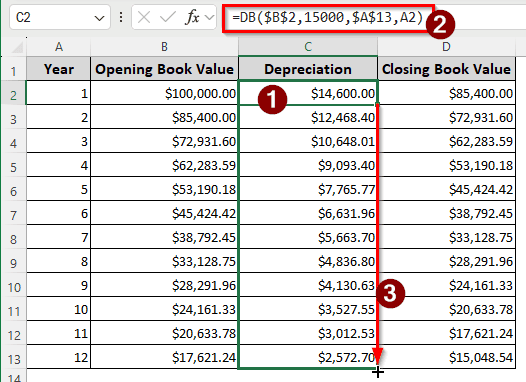
In this method, we will use a salvage value of $15000 to calculate the depreciation. The function for declining balance will be used for this.
➤ From the table we created in the previous method, select C2:C13 cells, and press Delete to clear the contents.
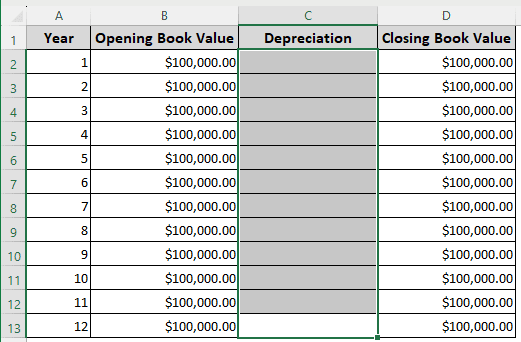
➤ Now, in the C2 cell, write the following formula and autofill the column:
=DB($B$2,15000,$A$13,A2)
Downloadable Resources
Get our practice workbook or necessary files that we have worked with to prepare this article.
WDV Method of Depreciation Calculation.xlsx
Frequently Asked Questions
Is residual value considered in the WDV method?
The WDV method does not directly deduct the residual value from the asset. However, after completing the asset’s lifetime, there will be some residual value left.
How to do the depreciation formula in Excel?
There are five depreciation formulas in Excel. Those are SLN, SYD, DB, DDB, and VDB. No matter what function you choose, you need the cost of the asset, the salvage value of the asset, the lifetime of the asset, and the period you are calculating the depreciation for.
How to calculate 25% depreciation?
Multiply the current value of the asset by 25% and you will get the depreciation. The Excel formula will be written like the following:
=A2*25%
Here, A2 is the value of the asset.
What is the WDV rate?
If you are calculating without considering the salvage value, you can use the percentage that your resource management department of your company decides. Otherwise, you can use the DB function in Excel, which does not need a fixed rate.
Which is better, SLM or WDV?
The SLM method is better when the asset does not need high maintenance or provides a high return. The WDV method is better for assets that do not have much resale value, and the company needs to be prepared to replace the machine.
Wrapping Up
In this article, we have learned the WDV methods of depreciation formula in Excel. We have shown two methods in the tutorial, and you are free to choose the one that suits your asset the best. Let us know in the comments which method you’d like us to cover next. We’ll see you in the next article.