If you are taking a loan to buy a home, you would have to pay the loan back through equated monthly installments. A home loan is one of the most popular and the largest loans people take in their lives. Before taking the loan, you need to make sure that you can pay the loan properly on a monthly basis. In this article, we will learn how to calculate home loan EMI in Excel.
➤ Write the following formula to calculate the EMI:
=PMT(B3/12,B4*12,-B2)
➤ Replace B3 with the loan amount, B4 with the loan tenure in years, and B2 with the loan amount.
In this article, we will learn the function of calculating EMI in detail, and we will create an amortization schedule for the loan as well. Focus on the article properly to learn the whole process step-by-step.
Calculating Home Loan EMI in Excel Using the PMT Function
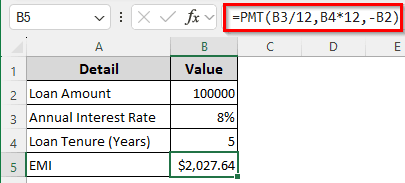
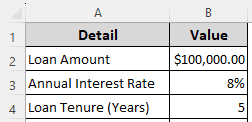
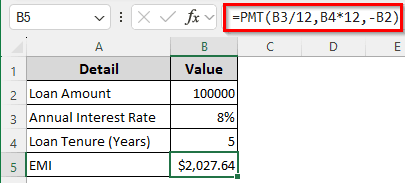
We have a table with three values: the loan amount, annual interest rate, and loan tenure in years. We will calculate the EMI using the PMT function provided by Excel.
➤ In the B5 cell, insert the following formula to calculate the EMI amount:
=PMT(B3/12,B4*12,-B2)
Computing the Home Loan EMI Manually
In this method, we will use the mathematical expressions instead of any dedicated functions provided by Excel. We are using a separate dataset for this one because it will help with the amortization schedule later.
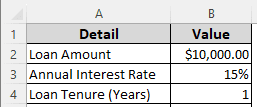
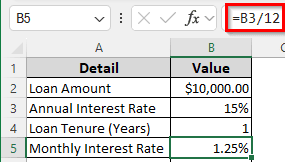
➤ First, let’s calculate the monthly interest rate in the B5 cell:
=B3/12
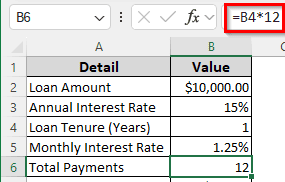
➤ Calculate the total payment in the B6 cell with the following formula:
=B4*12
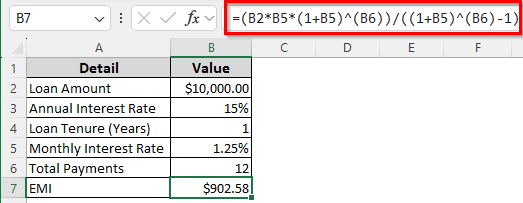
➤ Finally, calculate the EMI using the following formula:
=(B2*B5*(1+B5)^(B6))/((1+B5)^(B6)-1)
EMI = P * r * (1+r)n/(1+r)n -1
Here, P is from B2, r is from B5, and n is from B6.
Creating a Home Loan Amortization Schedule
Preparing a loan amortization schedule will help plan your EMI payments. In another sheet, we will be creating a home loan amortization schedule using the data from the last method.
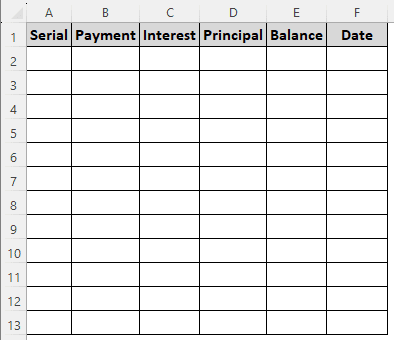
➤ Create a table with six columns with the following headings:
Serial, Payment, Interest, Principal, Balance, Date.
➤ For the rows, create as many rows as the payment count. In the previous method, we calculated 12 total payments. Therefore, there would be 12 rows other than headings.
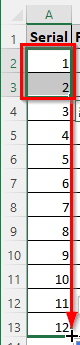
➤ In the first two rows of Serial, write 1 and 2. Then, select those two cells (A2 and A3 here), and drag the cells till A13 to autofill.
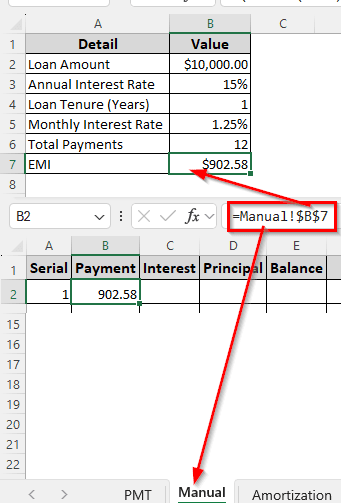
➤ In the B2 cell, write the following formula:
=Manual!$B$7
➤ In the C2 cell, insert the following formula:
=Manual!B2*Manual!$B$5
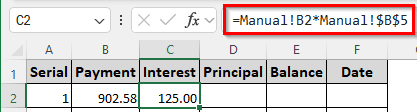
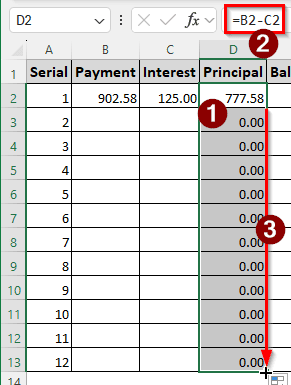
➤ In the D2 cell, insert the following formula and autofill the whole column.
=B2-C2
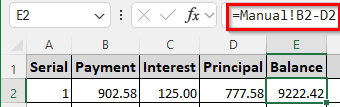
➤ In the E2 cell, insert the following formula to calculate the loan balance:
=Manual!B2-D2
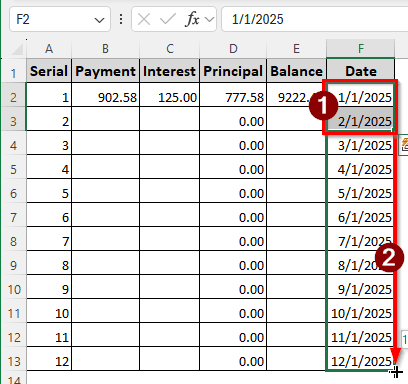
➤ In the F2 cell, write the first month for the date, and write the second month in the F3 cell. Then, select the F2 and F3 cells, and autofill the whole column with the autofill handle (+).
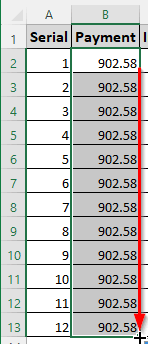
➤ Autofill the B column from B2 to B13.
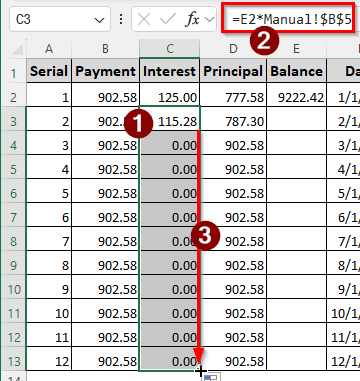
➤ In the C3 cell, write the following formula and autofill the column.
=E2*Manual!$B$5
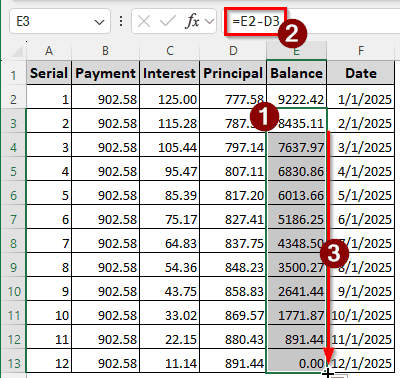
➤ Finally, insert the following formula in the E3 cell, and autofill the column to complete the loan amortization schedule.
=E2-D3
Frequently Asked Questions
What is a 12% interest rate?
In general, a 12% interest rate means that the interest for that particular loan will be charged at 12% per year. This is calculated on the principal loan amount, not by compound interest.
Is the interest calculation 360 or 365 days?
It largely depends on the financial institution. However, according to the US banking industry standards, to simplify calculations, the interest rate is calculated on a 360-day basis. In bond markets, the interest rate is often calculated using 365/366 days.
What is a good EMI amount?
A good EMI amount is 15-20% of your monthly income. However, in some cases, you might want to take a loan that takes up to 40% of your monthly income. Going for more than 40% is not worth it by any means.
How to pay a 30-year home loan in 10 years?
Try to make more prepayments if you can. By cutting costs, you need to increase payments, which will help by decreasing the loan tenure and interest.
What is a simple interest calculator?
The simplest form of interest calculation is multiplying the principal by the interest rate. In Excel, the formula would be as follows:
=A2*10%
Here, A2 contains the principal amount, and 10% is the interest amount.
Wrapping Up
In this article, we have learned how to calculate home loan EMI and how to create an amortization schedule. We hope that you have comprehended the methods in this tutorial properly. Download the article provided with this tutorial to see the formulas in action. We will see you in the next article.