When you are checking a list, checking over revisions, or trying to find changes between two sets of data in Google Sheets, you will need to compare them. You can compare big lists, highlight differences, and find matches quickly with Google Sheets’ built-in functions and basic formulas.
What Does Comparing Data Mean in Google Sheets?
In Google Sheets, comparing data means analyzing two or more sets of data to find out how they relate. It can be helpful when you are:
- Matching two values
- Identifying variations
- Looking for the missing values
- Finding duplicates
Comparing Two Columns to Find Missing Values in Google Sheets
When you are working with two lists in Google Sheets, you may want to compare them to see if anything is missing. Google Sheets makes it simple to compare two columns and identify any missing information quickly. Let’s look at the dataset where you have two lists: one consists of the students who signed up for a session, and the other of those who were present. You’d like to know who wasn’t there.
➤ Click on cell C2 and type this formula:
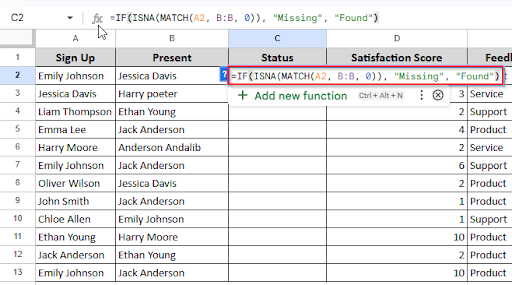
➤ Press Enter and see the result. If the column A names are found in Column B, then the status will be “Found”. Otherwise, the status will be “ Missing”
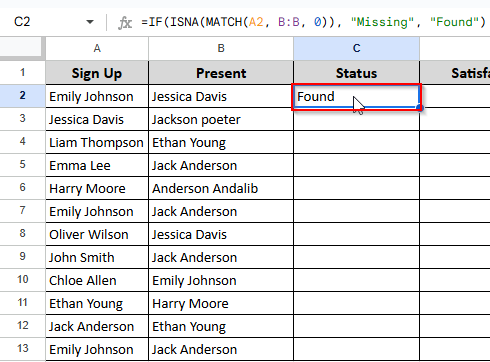
➤ Drag the formula down to apply it to the rest of the row.
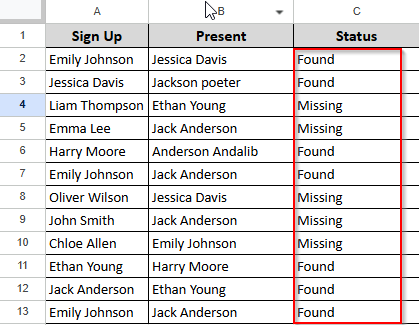
Comparing Two Columns for Matches in Google Sheets
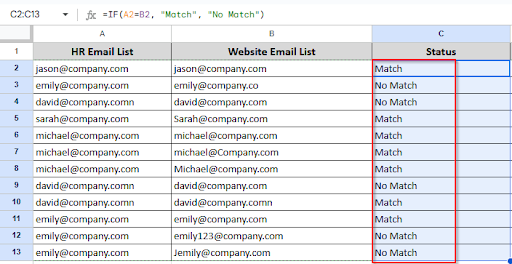
By comparing columns, you can reduce errors and save time when identifying mistakes, checking for duplicates, or verifying data. It is really helpful to see if the values match or not. You can compare two columns side by side with Google Sheets’ easy-to-use formulas. Let’s look at the dataset below, where you want to match column A with column B.
➤ Click on cell C2 and type this formula:
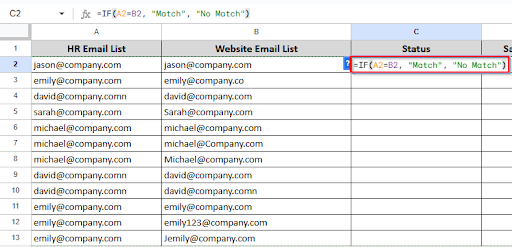
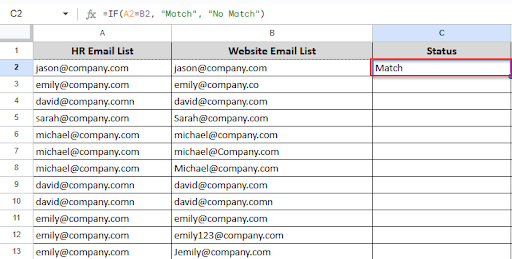
➤ Press Enter and see the result.
➤ Drag the formula down to apply it to the rest of the row.
Comparing Two Sheets for Differences in Google Sheets
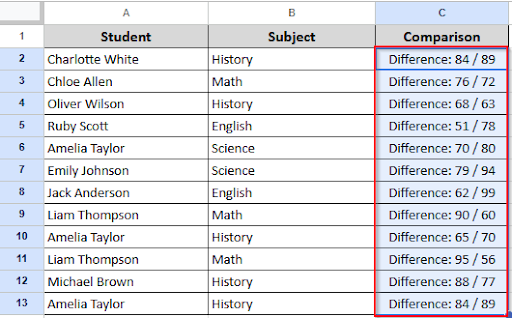
When we want to see what has changed between two copies of the same data, such as an old file and a new one. Such as a list of names, scores, or anything else could be included. Google Sheets makes it simple to compare the two sheets and quickly identify the differences. Let’s look at the dataset where you have two sheets(Marksheet1 and Marksheet2) and you want to find the differences between the scores of the two sheets.

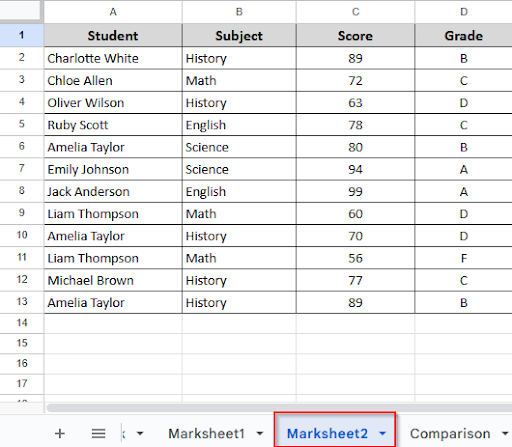
➤ Create a new worksheet and name the Column C “ Comparison”.
Click on cell C2 and type the formula:
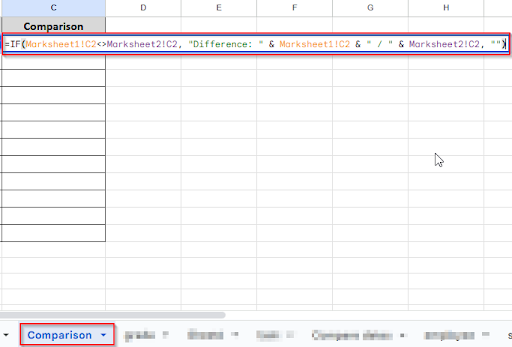
➤ Press Enter and see the result.
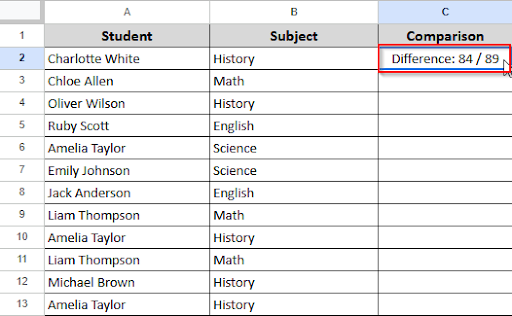
➤ Drag the formula down to apply it to the rest of the row.
Comparing Dates in Google Sheets
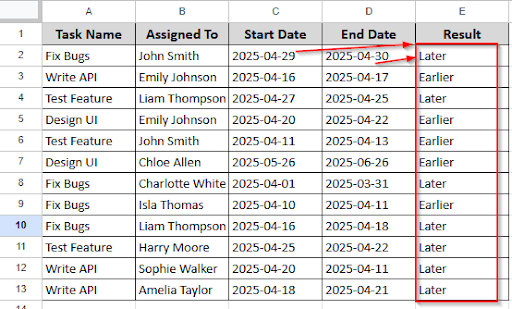
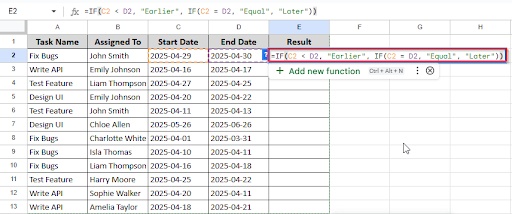
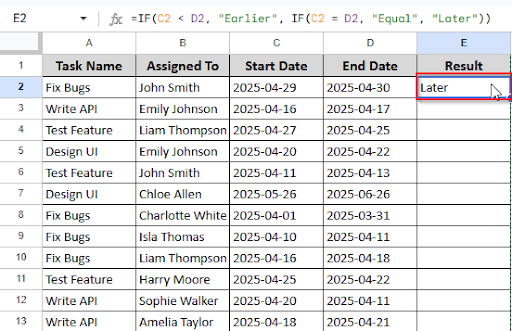
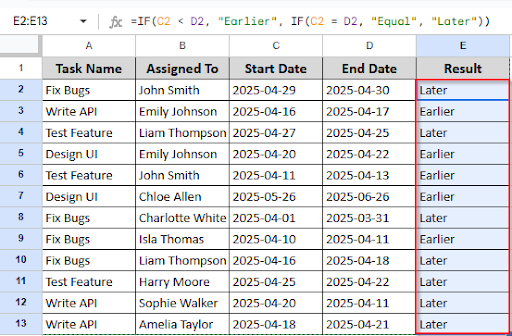
Dates are present in everything from daily tasks to school assignments, event schedules, and project deadlines. When working with data in Google Sheets, you might want to verify whether two dates match, whether a deadline has passed, or whether one date comes before another. Let’s look at the dataset where you want to know if the start date is earlier than the end date.
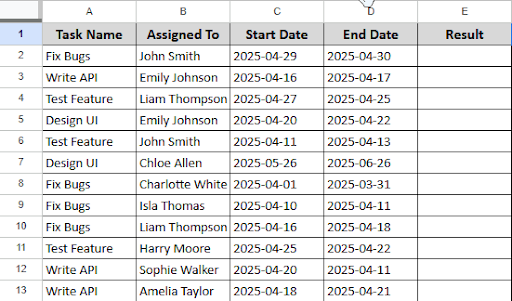
➤ Click on cell E2 and type this formula:
➤ Press Enter and see the result.
➤ Drag the formula down to apply it to the rest of the row.
Frequently Asked Questions
Is it possible to compare two sheets at once?
Yes, it is possible. If you open two sheets in a different browser, you can compare them simultaneously.
Can I compare the data between devices?
Yes, you can compare. Google Sheets is a cloud-based program, you can open one sheet on your PC and another on your smartphone.
Concluding Words
Google Sheets makes it incredibly quick and simple to compare data. Whether you’re looking for changes in numbers, finding date differences, or just making sure two lists match, Google Sheets offers many easy tools to assist. By comparing data in Google Sheets, you can save time and reduce errors.