The IF OR statement is a combination of two functions that lets you test multiple conditions in a single formula. It returns one result if any of the conditions are true and another result if none of ...
Working with dates in Excel is common, especially when you're tracking deadlines, calculating overdue tasks, or comparing sales timelines. The IF function is one of the most useful tools when it ...
In Excel, you often deal with number ranges and need to check if a value is inside a specific range. For example, you might want to mark scores that are between 70 and 90 or highlight sales amounts ...
Sometimes in Excel, you need to match a date to a specific range instead of looking for an exact match. For instance, when tracking sales across multiple promotions, you might want to label each ...
The HLOOKUP function in Excel looks up a value in the top row of a horizontal table and returns a matching value in a specific row below. But in real-time tasks, you may not want the lookup to happen ...
In Excel, comparing two columns can help you spot differences, check data consistency, or extract meaningful results. This is especially useful when managing lists such as employee attendance, ...
Sometimes in Excel, you need to pull more than one result. For example, a customer may appear several times in a sales record, and you want to list all of their order amounts. In these cases, Excel’s ...
Checking whether a cell is empty or not in Google Sheets is essential for effective data management and analysis. This enables users to apply conditional formatting and formulas with logic, only when ...
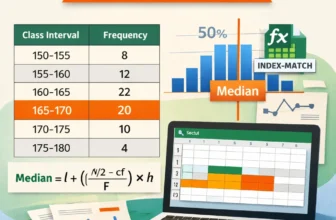
It can be challenging to find the median for grouped data in Excel because there isn't a built in function for it. To find the median for grouped data, follow specific steps and apply a formula. In ...