
Percentage is a mathematical term that expresses a number as a fraction of 100. It is often used to represent a part of a whole. The percentage is symbolized with “%”.
The formula for calculating the percentage of a number:
Percentage=(Part of a Number/Whole Number100)*100
Percentages are very commonly used in our daily life. You can use percentages to calculate the interest rates on loans and savings accounts, tax rates, school grades, probability and risks, etc. You can use different percentage formulas in Google Sheets to perform these tasks. In this article, you will briefly learn some basic operations with percentage formulas in Google Sheets.
How to Calculate Percentage in Google Sheets
You can add a percentage to a fraction to express the number in a better way.
To add percentage in Google Sheets:
➤ Divide a number with the reference number and calculate the fraction. To calculate the performance of an employee in fraction based on sales target, you can apply the following formula:
=C2/B2Where,
C2 = Sold Product
B2 = Sales Target
➤ Use Fill Handle to AutoFill the remaining cells.
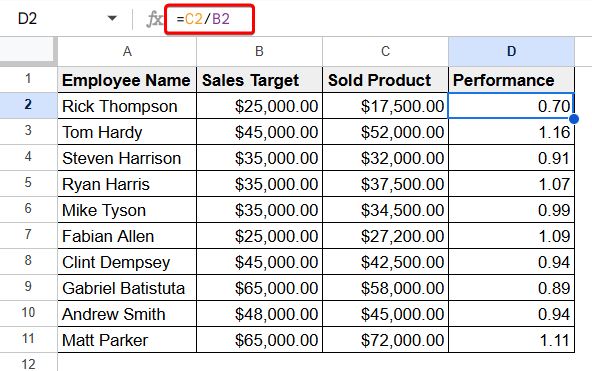
➤ Now, select all the performance values defined in fraction.
➤ Next, click on the percentage sign from the ribbon.
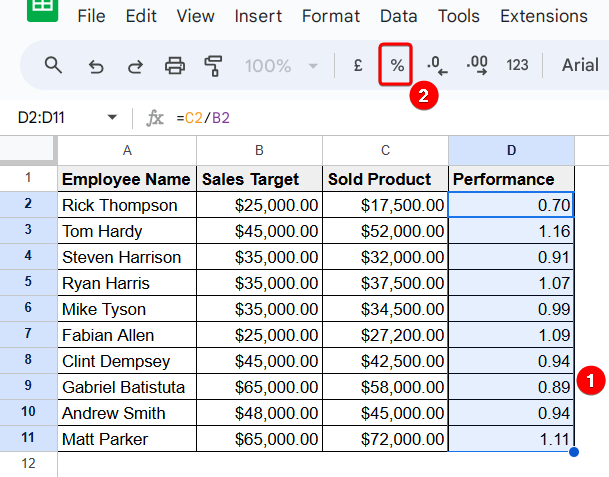
Thus, you can add percentages in Google Sheets.
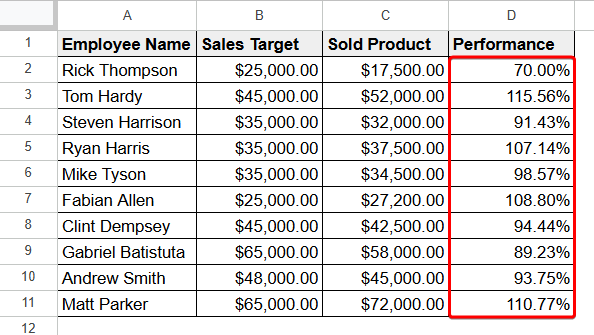
How to Add a Percentage in Google Sheets
You can add a percentage to a number and increase its value. We have to add the percentage of VAT to a product’s price to find its actual price.
To add a percentage to a value, use the following formula:
New Value = Original Value × (1+(Percentage/100))
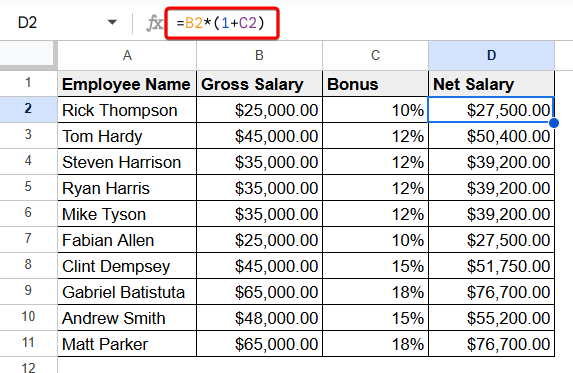
Here, we have a dataset of gross salary and bonus percentage of employees. To calculate the net salary of an employee, apply the following formula:
=B2*(1+C2)
How to Subtract a Percentage in Google Sheets
In our daily life, we often face the necessity to subtract a percentage from a certain number to find our desired output. You can subtract a percentage in Google Sheets quite easily.
Here, we have the gross salaries of the employees of a company. There is a certain tax rate based on the salary. To find the net salary, we need to subtract the tax rate percentage from the gross salary.
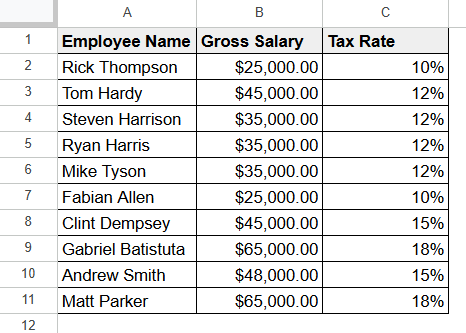
To subtract the tax rate percentages in Google Sheets, follow the following instructions:
➤Use the following formula to find the tax amount.
=B2*C2Here,
B2 = Gross Salary
C2 = Tax Rate
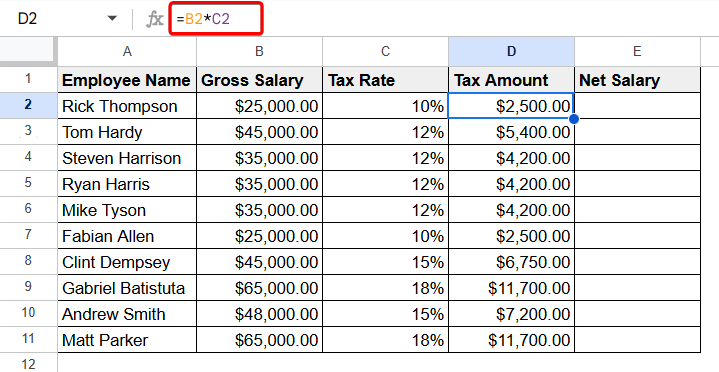
➤ Now, apply the following formula to find the net salary.
=B2-D2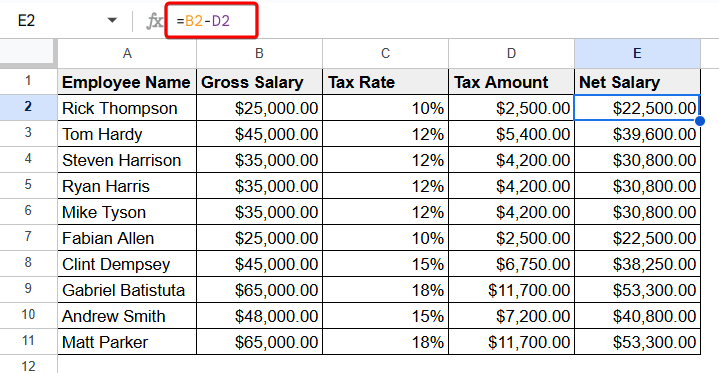
Thus, we can subtract a percentage in Google Sheets.
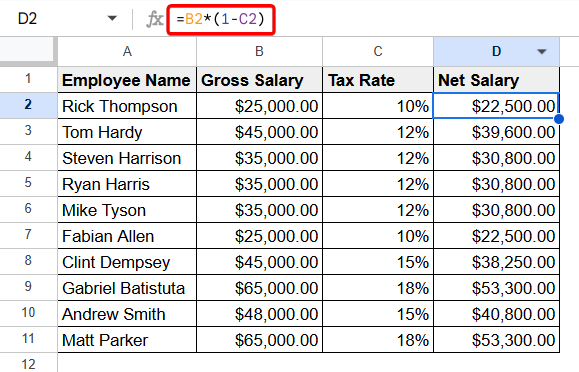
Alternatively, you can use the following formula to subtract a percentage in Google Sheets:
=B2*(1-C2)
How to Calculate Average Percentage in Google Sheets
Average percentage is the mean of a group of percentages.
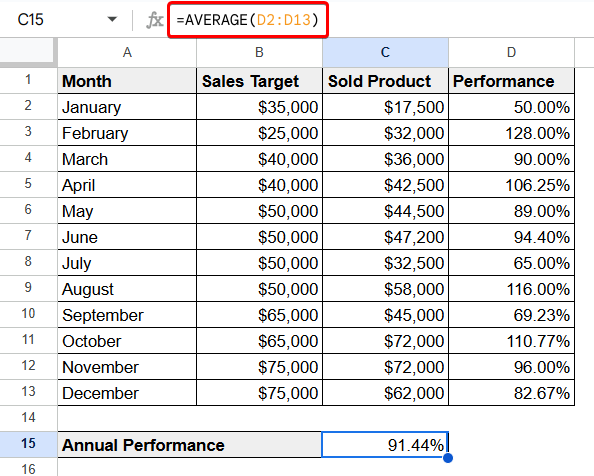
To calculate the average percentage in Google Sheets, use the following formula with the AVERAGE function:
=AVERAGE(D2:D13)
Where, D2:D13 are the performance percentages of all the months over the year.
Percentage Increase Formula in Google Sheets
To find out the continuous growth of an investment or organisation, you can use the percentage increase formula in Google Sheets.
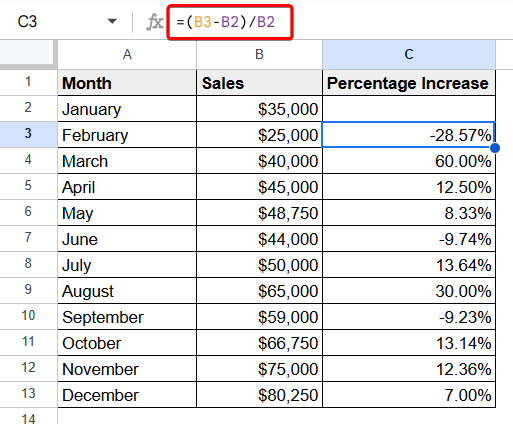
Here, we have the sales values of a company throughout the year. To find out the percentage increase in Google Sheets, follow the following steps:
➤ Write the following formula in a cell to calculate the sales increase:
=(B3-B2)/B2Where,
B3 = Sales in February
B2 = Sales in January
➤ Press Enter.
➤ Next, use Fill Handle to AutoFill the rest of the cells.
➤ Finally, select the cells of sales increase and change the cell format to percentage.
Frequently Asked Questions
What is the basic difference between a percentage and a decimal?
A percentage must be a fraction of 100 but a decimal can be a fraction with a denominator of 10, 100, 1000, etc.
How to format numbers as percentages in Google Sheets?
To format numbers as percentages, you have to select the cells first that you want to format and go to Format > Number > Percentage.
Concluding Words
From this article, you can have a brief summary on percentage formulas in Google Sheets. You can know the basic percentage calculation in Google Sheets as well as adding a percentage to a number, subtracting a percentage, calculating average percentage, and percentage increase formula. I hope it will be a great help for you.